
| 일 | 월 | 화 | 수 | 목 | 금 | 토 |
|---|---|---|---|---|---|---|
| 1 | 2 | 3 | ||||
| 4 | 5 | 6 | 7 | 8 | 9 | 10 |
| 11 | 12 | 13 | 14 | 15 | 16 | 17 |
| 18 | 19 | 20 | 21 | 22 | 23 | 24 |
| 25 | 26 | 27 | 28 | 29 | 30 | 31 |
- knn_classify
- 사이킷런
- Key 종류
- Hyperlink Graphs
- CREATETABLE
- sklearn
- 무결성
- Python
- latent factor model
- 잠재요소모델
- 힙
- SQLDDL
- 키 종류
- latent factor
- 백준
- 클린코드
- 무결성유지
- DROPTABLE
- 세대별가비지컬렉터
- 알고리즘
- TDD
- 컨테이너객체
- 주성분 찾기
- 붓꽃데이터셋
- ALTERTABLE
- RENAMETABLE
- SQL
- 문자열
- 파이썬
- 무결성유지메커니즘
- Today
- Total
DonHurry
[Python] Latent Factor Model 본문
데이터 준비
우선 오늘 실습에 사용할 데이터입니다. 영화 평점 데이터셋으로, 아래 링크에서 다운 받으실 수 있습니다. 데이터의 크기가 다양하게 존재하는데, 오늘 사용할 데이터셋 크기는 100K로 작은 데이터를 활용하겠습니다.
MovieLens
GroupLens Research has collected and made available rating data sets from the MovieLens web site ( The data sets were collected over various periods of time, depending on the size of the set. …
grouplens.org
Colab에서 구글 드라이브 연결하기
코랩 환경에서 실습을 진행할 때, 구글 드라이브에서 데이터를 불러올 수 있습니다. 연결하려는 구글 드라이브에 미리 파일을 저장하면 됩니다. 파일이 큰 경우에는 코랩 상에서 !unzip 명령어를 사용하여 압축을 해제하는 것이 더 빠르지만, 파일이 작으니 그냥 압축을 먼저 해제하고 저장하시면 됩니다.
from google.colab import drive
drive.mount('/content/drive')
Mounted at /content/drive
코랩(주피터 노트북) 상에서 리눅스 명령어를 사용할 때는 '!'를 앞에 붙혀주시면 됩니다. ls 명령어를 통해 파일을 확인합니다.
!ls "/content/drive/MyDrive/ml-100k"allbut.pl u1.base u2.test u4.base u5.test ub.base u.genre u.occupation
mku.sh u1.test u3.base u4.test ua.base ub.test u.info u.user
README u2.base u3.test u5.base ua.test u.data u.item
모듈 불러오기
먼저 앞으로 필요한 모듈들을 import 해줍니다.
import torch
import pandas as pd
import torch.nn.functional as F
import matplotlib.pyplot as plt
파일 불러오기
이제 파일을 불러올 차례입니다. 앞서 ls 명령어를 통해 살펴본 파일 중, ua.base와 ua.test를 활용하도록 하겠습니다.
파일의 형식은 csv로 pandas를 활용하여 불러올 수 있습니다. 이때 파일의 형식을 살펴보면 데이터의 구분자가 tab이고, 각 column명이 없습니다. 따라서 pd.read_csv로 불러올 때, sep과 names 함수 파라미터들을 사용합니다.
# 구분자가 tab임을 알려주어야 함
# 파일에 column 명이 없으므로 names 활용
train = pd.read_csv("/content/drive/MyDrive/ml-100k/ua.base", sep="\t", names=['user', 'movie', 'rating', 'timestamp'])
test = pd.read_csv("/content/drive/MyDrive/ml-100k/ua.test", sep="\t", names=['user', 'movie', 'rating', 'timestamp'])
다음으로 불러온 데이터를 pytorch tensor 형식으로 변환하도록 하겠습니다. 앞서 데이터를 train과 test셋으로 분류하였으므로, 여기서도 나누어서 변환해줍니다.
items = torch.tensor(train['movie'], dtype=torch.long)
users = torch.tensor(train['user'], dtype=torch.long)
ratings = torch.tensor(train['rating'], dtype=torch.float)

items_test = torch.tensor(test['movie'], dtype=torch.long)
users_test = torch.tensor(test['user'], dtype=torch.long)
ratings_test = torch.tensor(test['rating'], dtype=torch.float)
Latent Factor Model
Matrix Factorization을 진행하기 전에 사용자와 아이템에 관한 matrix 세팅을 먼저 해주어야 합니다. 잠재 벡터 크기를 rank라는 변수로 설정합니다. 예제에서는 10으로 진행하도록 하겠습니다.
rank = 10 # 사용자 vector, 아이템 vector의 차원

numItems = items.max() + 1 # 아이템 수
numUsers = users.max() + 1 # 사용자 수

# 0으로 초기화 하는 것보다 랜덤하게 초기화 하는 것이 학습이 잘 될 확률이 높음
P = torch.randn(numItems, rank, requires_grad=True) # 아이템 매트릭스
Q = torch.randn(numUsers, rank, requires_grad=True) # 사용자 매트릭스
생성된 매트릭스의 차원을 살펴보면 다음과 같습니다.
print(P.shape, Q.shape)(torch.Size([1683, 10]), torch.Size([944, 10]))
이제 본격적으로 학습을 진행합니다. optimizer는 Adam을 사용하며, 파라미터는 앞서 생성한 P와 Q를 이용하겠습니다. 앞서 수행한 실습들과 마찬가지로 가설 h와 비용 cost를 설정해줍니다. 아래 코드에서는 test도 함께 진행했는데, 실제로는 이런 식으로 진행하지는 않습니다. 보통 train과 test를 따로 수행합니다. 학습을 진행할수록 P와 Q의 파라미터가 손실함수를 줄이는 방향으로 조정됩니다.
optim = torch.optim.Adam([P, Q], lr = 0.1)

X = []
Y = []
Y_test = []

for epoch in range(1001):
  h = (P[items] * Q[users]).sum(dim=1)
  cost = F.mse_loss(h, ratings)

  optim.zero_grad()
  cost.backward()
  optim.step()

  with torch.no_grad():
    X.append(epoch)
    Y.append(cost.item())

    # 실제로 이런 식으로 코딩 하진 않음
    h_test = (P[items_test] * Q[users_test]).sum(dim=1)
    cost_test = F.mse_loss(h_test, ratings_test)
    Y_test.append(cost_test.item())

    if epoch % 100 == 0:
      print(f"epoch: {epoch}, cost: {cost.item()}")
epoch: 0, cost: 23.919946670532227
epoch: 100, cost: 0.5669679641723633
epoch: 200, cost: 0.49337249994277954
epoch: 300, cost: 0.4697325825691223
epoch: 400, cost: 0.4582059681415558
epoch: 500, cost: 0.45214635133743286
epoch: 600, cost: 0.4487079083919525
epoch: 700, cost: 0.4463438093662262
epoch: 800, cost: 0.4446922540664673
epoch: 900, cost: 0.443502277135849
epoch: 1000, cost: 0.44253602623939514
시각화를 진행해봅니다. train에서는 cost가 매우 작은 수로 수렴하는 것을 확인할 수 있지만, test 데이터에서는 점점 cost가 높아지는 것을 확인할 수 있습니다. 이는 파라미터들이 지나치게 train 데이터셋에 오버피팅되었음을 의미합니다.
plt.figure(dpi=100)
plt.plot(X, Y, label="Train MSE")
plt.plot(X, Y_test, label="Test MSE")
plt.legend()
plt.show()
Regularization
오버피팅을 해결하는 방법 중 하나는 정규화를 시켜주는 것입니다. 이번에는 학습과 시각화 모두 한 코드블럭으로 진행해보겠습니다. 기존에는 cost를 backward시켰지만, 이번에는 loss라는 변수를 만들고 cost에 특정 값을 더해줍니다.
P와 Q를 제곱해서 mean 혹은 sum을 해서 기존 cost 값에 더해주는데, 이는 튀는 값들을 없애주기 위함입니다. 파라미터들이 특정 데이터에 과적합되어 있어 일부 값이 특출나게 튀어있다면, 새로운 데이터가 들어왔을 때 성능이 좋지 않습니다. 때문에 아래와 같은 과정을 통해 파라미터의 튀는 값들을 없애는 방향으로 학습을 진행시키는 것입니다. 시각화한 결과를 보면 test 데이터셋에서도 성능이 좋게 나오는 것을 확인할 수 있습니다.
P = torch.randn(numItems, rank, requires_grad=True) # 아이템 매트릭스
Q = torch.randn(numUsers, rank, requires_grad=True) # 사용자 매트릭스

lambda1 = 1
lambda2 = 1
optim = torch.optim.Adam([P, Q], lr = 0.1)

X = []
Y = []
Y_test = []

for epoch in range(1001):
  h = (P[items] * Q[users]).sum(dim=1)
  cost = F.mse_loss(h, ratings)
  # sum을 하든 mean을 하든 결과는 같음
  # 튀는 값들을 사라지게 하기 위함이므로
  loss = cost + lambda1 * (P**2).mean() + lambda2 * (Q**2).mean()

  optim.zero_grad()
  loss.backward()
  optim.step()

  with torch.no_grad():
    X.append(epoch)
    Y.append(cost.item())

    h_test = (P[items_test] * Q[users_test]).sum(dim=1)
    cost_test = F.mse_loss(h_test, ratings_test)
    Y_test.append(cost_test.item())

    if epoch % 100 == 0:
      print(f"epoch: {epoch}, cost: {cost.item()}, test_cost: {cost_test.item()}")


print()

plt.figure(dpi=100)
plt.plot(X, Y, label="Train MSE")
plt.plot(X, Y_test, label="Test MSE")
plt.legend()
plt.show()
epoch: 0, cost: 23.172462463378906, test_cost: 21.258317947387695
epoch: 100, cost: 0.6601173281669617, test_cost: 1.007965326309204
epoch: 200, cost: 0.6048451066017151, test_cost: 1.0196946859359741
epoch: 300, cost: 0.5932756662368774, test_cost: 1.0203676223754883
epoch: 400, cost: 0.5900246500968933, test_cost: 1.0199319124221802
epoch: 500, cost: 0.5887171030044556, test_cost: 1.019777536392212
epoch: 600, cost: 0.5881035327911377, test_cost: 1.0199692249298096
epoch: 700, cost: 0.5878186225891113, test_cost: 1.020143747329712
epoch: 800, cost: 0.5876771807670593, test_cost: 1.0202783346176147
epoch: 900, cost: 0.5876007676124573, test_cost: 1.0204029083251953
epoch: 1000, cost: 0.5875604748725891, test_cost: 1.02051842212677

Bias 추가
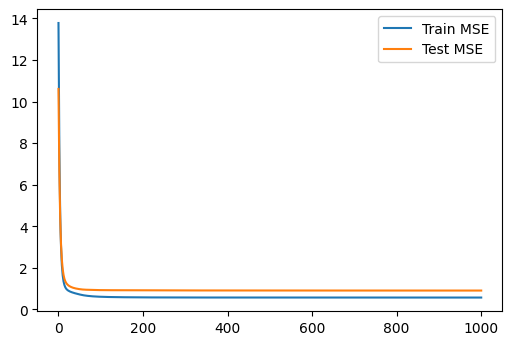
앞서 시각화한 결과들을 보면 초반에 급격하게 꺾이는 부분이 매끄럽지 못하다는 것을 알 수 있습니다. 이는 편향값을 추가함으로써 해결할 수 있습니다. 방법은 앞선 정규화 방법과 비슷합니다. 다만, 편향 파라미터 매트릭스를 따로 생성해주어야 합니다. 또한 편향은 가설 h에도 더해주어야합니다.
P = torch.randn(numItems, rank, requires_grad=True) # 아이템 매트릭스
Q = torch.randn(numUsers, rank, requires_grad=True) # 사용자 매트릭스

bias_item = torch.randn(numItems, requires_grad=True)
bias_user = torch.randn(numUsers, requires_grad=True)
mean = ratings.mean()

lambda1 = 1
lambda2 = 1
lambda3 = 1
lambda4 = 1

optim = torch.optim.Adam([P, Q, bias_item, bias_user], lr = 0.1)

X = []
Y = []
Y_test = []

for epoch in range(1001):
  h = (P[items] * Q[users]).sum(dim=1) + mean + bias_item[items] + bias_user[users]
  cost = F.mse_loss(h, ratings)
  loss = cost + lambda1 * (P**2).mean() + lambda2 * (Q**2).mean() + lambda3 * (bias_user**2).mean() + lambda4 * (bias_item**2).mean()

  optim.zero_grad()
  loss.backward()
  optim.step()

  with torch.no_grad():
    X.append(epoch)
    Y.append(cost.item())

    h_test = (P[items_test] * Q[users_test]).sum(dim=1) + mean + bias_item[items_test] + bias_user[users_test]
    cost_test = F.mse_loss(h_test, ratings_test)

    Y_test.append(cost_test.item())

    if epoch % 100 == 0:
      print(f"epoch: {epoch}, cost: {cost.item()}, test_cost: {cost_test.item()}")


print()

plt.figure(dpi=100)
plt.plot(X, Y, label="Train MSE")
plt.plot(X, Y_test, label="Test MSE")
plt.legend()
plt.show()
epoch: 0, cost: 13.782000541687012, test_cost: 10.609686851501465
epoch: 100, cost: 0.608058750629425, test_cost: 0.9282452464103699
epoch: 200, cost: 0.5786076784133911, test_cost: 0.9187856316566467
epoch: 300, cost: 0.5731916427612305, test_cost: 0.9131919741630554
epoch: 400, cost: 0.5717451572418213, test_cost: 0.9107112288475037
epoch: 500, cost: 0.5712419152259827, test_cost: 0.9093411564826965
epoch: 600, cost: 0.571007251739502, test_cost: 0.9086859226226807
epoch: 700, cost: 0.5708647966384888, test_cost: 0.9083752632141113
epoch: 800, cost: 0.5707736611366272, test_cost: 0.9081287980079651
epoch: 900, cost: 0.5707151293754578, test_cost: 0.9077973961830139
epoch: 1000, cost: 0.5706698298454285, test_cost: 0.9073463678359985
'Data Science' 카테고리의 다른 글
| [Python] PageRank (1) | 2022.12.15 |
|---|---|
| [Python] PCA (Principal Component Analysis) (0) | 2022.12.14 |
| [Python] KNN (K-Nearest Neighbors) (0) | 2022.12.13 |
| [Python] Clustering (0) | 2022.12.12 |
| [Python] Linear Regression (2) | 2022.11.07 |


